New Fresh deep-dives on cloud, AI, mobile & web now publish on blog.msdevbuild.com Read the latest → Install the app
Visual Studio

Getting Started with Xamarin Application using Visual Studio for Mac

By   Sunday, May 14, 2017 comments
reads
React:

Introduction:

Visual Studio 2017 for mac was launched at MS Build 2017 with many fresh and exciting features for Visual Studio developers in mac machine. Mac OS user can build apps for mobile, web, and cloud with Xamarin and .NET Core, games with Unity using Visual Studio.

In this article, I will share how to create new Xamarin.Forms application using Visual studio for mac.
System Requirement:

Visual Studio 2017 for mac will install and run on the following operating system
MacOS Sierra 10.12 or Mac OS X El Capitan 10.11
Xcode 8.3 or above requires macOS Sierra 10.12,
Xamarin.Android requires the 64-bit Java Development Kit (JDK)
1.8 GHz or faster processor with min 4GB RAM .

Install Visual Studio for mac:

Download Visual Studio 2017 for mac from https://www.visualstudio.com/vs/?os=mac .If you are downloading before May 17, you will get free 60-day access to Xamarin University.

Create New Xamarin.Forms Application:

Step 1: Launch VS from mac:

Launch Visual Studio for mac from Launchpad


Step 2: Create New Solution :

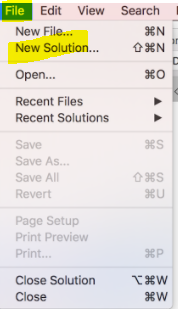
Create New Solution (File >New Solution) or VS home screen > Click on New Project

Step 3: Choose a Template:

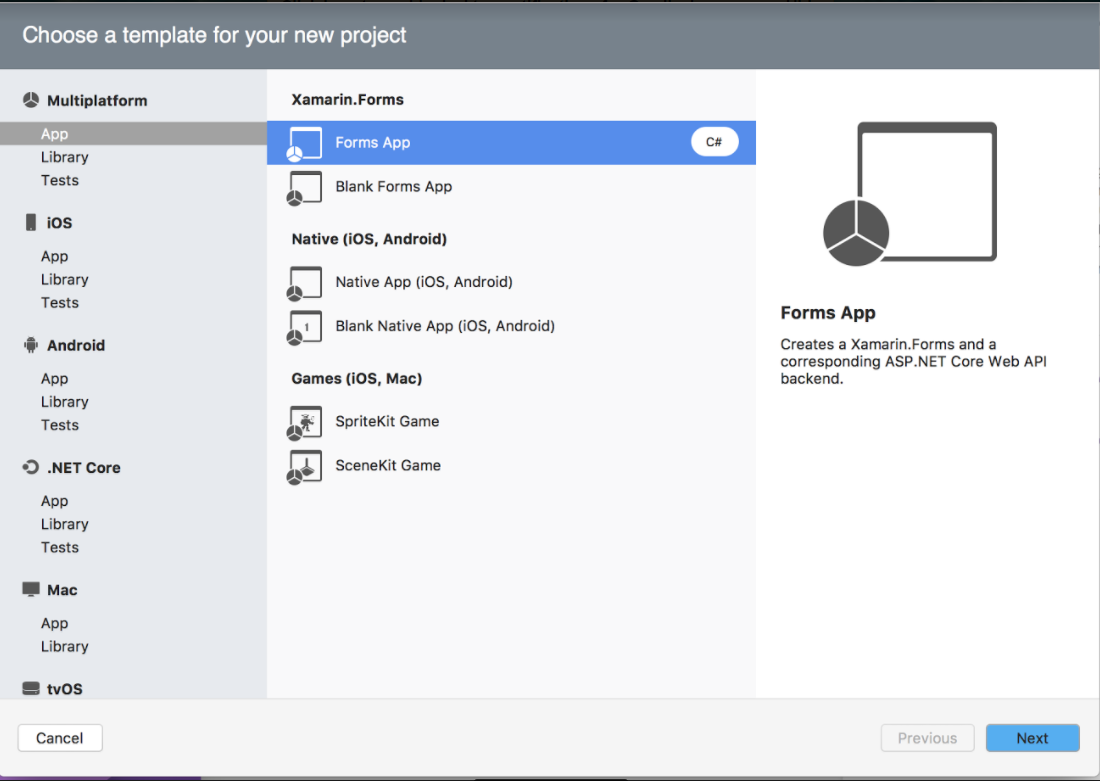
Visual Studio for mac will support to develop apps for Android, macOS, iOS, tvOS, watchOS, web, and cloud. Code fast and test. Here, I will select xamarin.Forms template under multiplatform .

Step 4: Multiplatform Xamarin.Forms Application:

The Multiplatform Xamarin.Forms App and the Native App project templates now provide you a quick way to create a multiplatform mobile app with cloud backend. This template will include Xamarin.iOS ,Xamairn.Android and share code with cloud service .

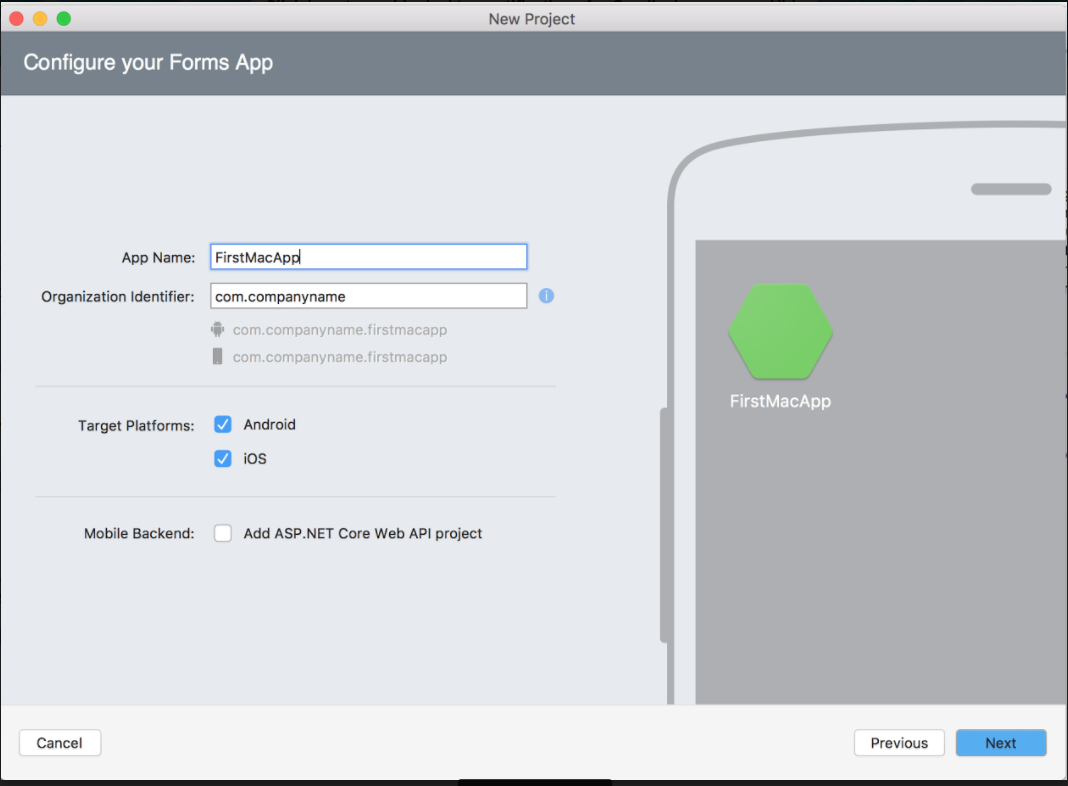
Provide App name. identifier, platform and mobile backend detail from following screen

Step 5: Configure Your Application:

Provide the project, solution name, local location and version control details from following screen


Step 6: Solution successfully Created:

You can do Drag and Drop UI Design for iOS and android with Live preview and building, deployment, debugging the application.


Step 7: Run the Application:

Debug and Run the xamarin application


Summary:

This article you learned VS system requirement, install Visual studio from mac and how to create new xamarin application using Visual studio for mac.

If you have any question/ feedback/ issues, please write them in the comment box
SJ
Suthahar Jegatheesan

Cloud, AI & Mobile Solutions Architect · 18+ years across Azure, Google Cloud and Firebase, C#, Python, .NET MAUI and Flutter. Author of the Xamarin Q&A Book.

More in this series

1 comment:

  1. Nice blog..i was really impressed by seeing this blog, it was very interesting and it is very useful for me.also the information which you have mentioned here is correct and impressive. Really appreciate.

    Hire Xamarin Developer
    Xamarin Development Company

    ReplyDelete

sponsored

What Colleagues Say

“Suthahar is one of the most thorough and knowledgeable cloud architects I’ve worked with. His depth on Azure and ability to make complex mobile solutions work cross-platform is remarkable. He always delivers beyond expectations.”

AT Arun T. Senior Engineering Manager · Direct Manager

“I’ve followed Suthahar’s MSDEVBUILD blog for years — practical, deep, always current. Working alongside him confirmed what I suspected: he’s as sharp in person as on paper, and a genuinely generous mentor and architect.”

RK Rajesh K. Lead Developer · Mindtree

Certifications & Recognition

AZ-300 · Azure Architect Technologies AZ-301 · Azure Architect Design AZ-104 · Azure Administrator Associate AI-100 · Designing Azure AI Solutions DP-900 · Azure Data Fundamentals MCPD · Windows Phone Certified SAFe® 4 Scrum Master

Technical Expertise

☁ Cloud Platforms Microsoft Azure — Expert · 18 yrs App Services · AKS · Functions · Cosmos DB · APIM · Entra ID AWS & Google Cloud — Advanced
πŸ€– AI & Automation Azure OpenAI / GenAI — Advanced · 5 yrs RAG Pipelines · Bot Framework · Cognitive Services · Vision & Speech AI · ML.NET
πŸ“± Mobile Architecture .NET MAUI & Xamarin — Expert · 12 yrs Flutter · Native iOS/Android · Offline-First · Secure Storage & Auth
πŸ”’ Identity & Security Microsoft Entra ID — Expert OAuth 2.0 · OIDC · Zero Trust · Conditional Access · RBAC · Key Vault

Speaking & Community

Microsoft User Group Malaysia Recurring speaker on Azure architecture, AI integration and .NET mobile development across Malaysia and APAC.
Global Azure Bootcamp — Chennai Presented “AI into Xamarin Mobile Apps” at GAB Chennai, part of the worldwide Global Azure community event.
AI & Azure OpenAI Community Events Workshops and live demos on RAG pipelines, AI agents and intelligent workflow automation since 2023.
Mobile & Cloud Workshops — Coimbatore Multi-day deep-dive sessions at GRG Computer Technology, KG Microsoft Innovation Center and RVS College of Arts and Science.
500+Blog Articles
50+Conference Talks
10K+Monthly Readers
30Public Repositories
3Continents Delivered
New home

MSDEVBUILD now publishes on blog.msdevbuild.com

Every new article lands there first — cloud and Azure, AI and GitHub Copilot, .NET MAUI and Flutter, web and Firebase. It installs as an app, opens like a native one and keeps working offline.

MSDEVBUILD Assistant Ask about Suthahar, Azure, AI or mentorship
Hi! I’m a simple FAQ bot for MSDEVBUILD. Tap a question below or type your own.