At the Build 2016 conference, Microsoft introduced the exciting news that Xamarin will now be available for all existing MSDN users at no extra cost.
Windows Developer:
Xamarin is included in Visual Studio. Now you can develop mobile cross application using windows machine.Mac Developer:
MSDN subscription users can download Xamarin Studio for Mac machine, no need to pay any payment.Step 1:
Login to MSDN subscription - https://msdn.microsoft.com/en-us/subscriptionsStep 2:
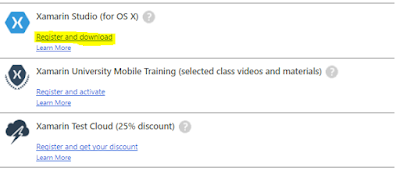
Click on Register and Download
Step 3:
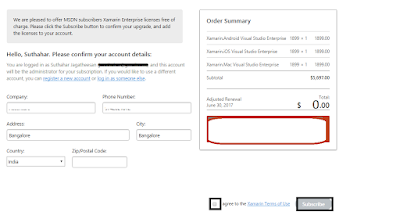
Click checkbox on “I Agree “& Click on “Subscribe” button
Step 4:
Now you can develop mobile cross application. Free Licensing will allow only one machine at a time.If you want to use different machine, you want to disable previous machine licensing like belowStep 4.1:
Login to Xamarin.comStep 4.2:
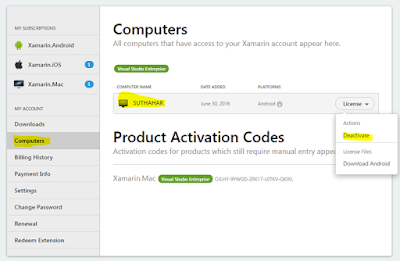
Go to https://store.xamarin.com/account/my/subscription/computersStep 4.3:
Click on Deactivate and Enable different machine .
No comments: