New Fresh deep-dives on cloud, AI, mobile & web now publish on blog.msdevbuild.com Read the latest → Install the app
Xamarin

How to build 64-bit Xamarin Android Application

By   Saturday, July 13, 2019 comments
reads
React:
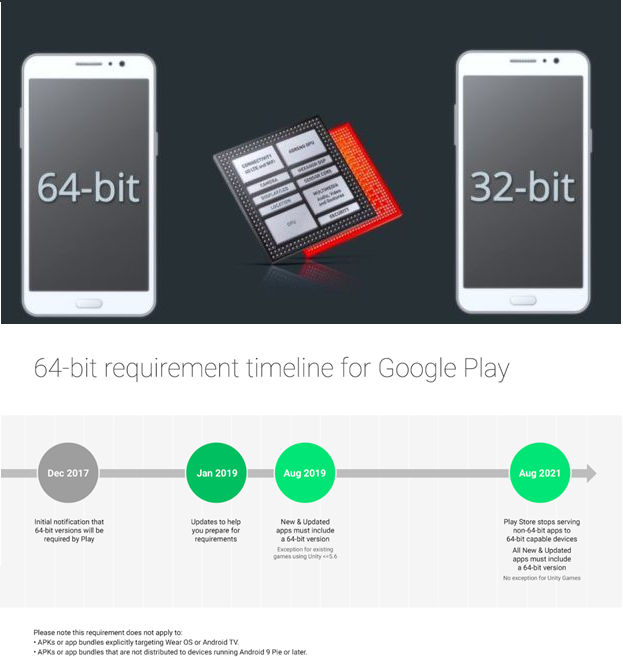
Google announced all Android app should support 64-bit architectures from Aug 1, 2019. 64-bit CPUs deliver faster, richer experiences for your users. Google Play will continue to support 32-bit apps for now, but as of August 1, 2019 all new apps and updates that include native code must have 64-bit versions as well as 32-bit versions when publishing to Google Play. This ruling applies to apps written in native, Xamarin or apps with links to third-party native libraries.

Android application supports four ABIs that can be selected when building mobile app. You can Select which ABIs your application supports in the project android options properties, if no ABI is specified, “armeabi-v71” is used in release build and As of Xamarin.Android 9.2, armeabi is no longer supported.


  1. armeabi-v7a – ARM-based CPUs with hardware floating-point operations and multiple CPU (SMP) devices.
  2. arm64-v8a – CPUs based on the 64-bit ARMv8 architecture.
  3. x86 – CPUs that support the x86 (or IA-32) instruction set.
  4. x86_64 – CPUs that support the 64-bit x86 .
You can follow the below steps for select 64-bit android application in the Visual studio and Visual studio mac.
Visual Studio in Windows machine:
Step 1: You can open Visual Studio in the windows machine, right-click on android project and select Properties
Step 2: Select the Android Options tab and Click the Advanced button and, check the architectures that you want to support.
Visual Studio Mac:
You can open Visual Studio mac in the mac machine and open/ create new project Android project.
Step 1:  Right-click on Android project under the Solution Explorer and select Properties.
Step 2: Under the Android Options page check the Packaging properties section and Click the Advanced button and select the architectures that you want to support:
How to check if your device is 32-bit or 64-bit?
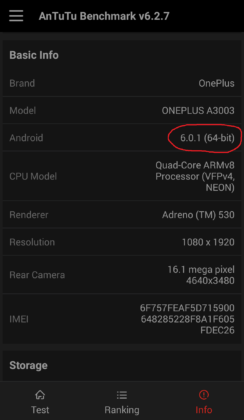
You can also check if your phone is 64-bit in android using the app Antutu Benchmark. While this is a benchmarking app, you can just use it to view your device information. Open Antutu Benchmark and click on “info”.
https://fossbytes.com/wp-content/uploads/2017/09/Screenshot_20170914-113209-min-244x420.png
Summary:
The android applications already support 64-bit, no need to do anything, If you haven’t yet, you can change the as per the above steps as soon as possible. I hope this article will help you. Please leave your feedback/query using the comments box, and if you like this article, please share it with your friends.

SJ
Suthahar Jegatheesan

Cloud, AI & Mobile Solutions Architect · 18+ years across Azure, Google Cloud and Firebase, C#, Python, .NET MAUI and Flutter. Author of the Xamarin Q&A Book.

More in this series

2 comments:

  1. Do I need to publish x86_64 too?

    ReplyDelete
  2. Woah!! Such a piece of the nice information you have shared here, I have read the entire post and I must say that the information is very helpful for me.
    Hire Xamarin Developer
    Xamarin Development Company

    ReplyDelete

sponsored

What Colleagues Say

“Suthahar is one of the most thorough and knowledgeable cloud architects I’ve worked with. His depth on Azure and ability to make complex mobile solutions work cross-platform is remarkable. He always delivers beyond expectations.”

AT Arun T. Senior Engineering Manager · Direct Manager

“I’ve followed Suthahar’s MSDEVBUILD blog for years — practical, deep, always current. Working alongside him confirmed what I suspected: he’s as sharp in person as on paper, and a genuinely generous mentor and architect.”

RK Rajesh K. Lead Developer · Mindtree

Certifications & Recognition

AZ-300 · Azure Architect Technologies AZ-301 · Azure Architect Design AZ-104 · Azure Administrator Associate AI-100 · Designing Azure AI Solutions DP-900 · Azure Data Fundamentals MCPD · Windows Phone Certified SAFe® 4 Scrum Master

Technical Expertise

☁ Cloud Platforms Microsoft Azure — Expert · 18 yrs App Services · AKS · Functions · Cosmos DB · APIM · Entra ID AWS & Google Cloud — Advanced
πŸ€– AI & Automation Azure OpenAI / GenAI — Advanced · 5 yrs RAG Pipelines · Bot Framework · Cognitive Services · Vision & Speech AI · ML.NET
πŸ“± Mobile Architecture .NET MAUI & Xamarin — Expert · 12 yrs Flutter · Native iOS/Android · Offline-First · Secure Storage & Auth
πŸ”’ Identity & Security Microsoft Entra ID — Expert OAuth 2.0 · OIDC · Zero Trust · Conditional Access · RBAC · Key Vault

Speaking & Community

Microsoft User Group Malaysia Recurring speaker on Azure architecture, AI integration and .NET mobile development across Malaysia and APAC.
Global Azure Bootcamp — Chennai Presented “AI into Xamarin Mobile Apps” at GAB Chennai, part of the worldwide Global Azure community event.
AI & Azure OpenAI Community Events Workshops and live demos on RAG pipelines, AI agents and intelligent workflow automation since 2023.
Mobile & Cloud Workshops — Coimbatore Multi-day deep-dive sessions at GRG Computer Technology, KG Microsoft Innovation Center and RVS College of Arts and Science.
500+Blog Articles
50+Conference Talks
10K+Monthly Readers
30Public Repositories
3Continents Delivered
New home

MSDEVBUILD now publishes on blog.msdevbuild.com

Every new article lands there first — cloud and Azure, AI and GitHub Copilot, .NET MAUI and Flutter, web and Firebase. It installs as an app, opens like a native one and keeps working offline.

MSDEVBUILD Assistant Ask about Suthahar, Azure, AI or mentorship
Hi! I’m a simple FAQ bot for MSDEVBUILD. Tap a question below or type your own.