Azure Functions is a solution for easily running small pieces of code in the cloud. We can create, execute, and test our custom logic function without creating a VM or web applications and also without needing to install any software or infrastructure to run the function. In this article, How to implement azure functions and directly called through HTTP from Xamarin Forms Application
Create Azure Functions :
I have explained about different ways to create basic Azure Functions in my previous article, you can refer any of the below one article for creating new Azure functions.
- Getting Started With Azure Functions Using Azure Free Trial Account
- How To Create And Test Azure Functions Using Azure Portal
- Getting Started With Microsoft Azure Functions Using Visual Studio 2017
Create New Xamarin Forms Client Application :
We need to create a new blank XamarinIf you have already installed VS on your machine, open Visual Studio >> Create New Project
The Solution will be created with all the platform and PCL projects.
.

Design portable UI :
The UI will have a few elements on the screen. Entry Control for providing user input value and label for print output text<
<
xmlns:x="http://schemas.microsoft.com/winfx/2009/xaml"
x:Class="AzureFunctionsDemo.MainPage">
<
<!--Title text-->
<Label Text ="Building Serverless Mobile App with Azure Functions using Xamarin Forms" HorizontalOptions="Center" TextColor="Green" FontSize="30" />
<!--Provide Input Parameter to Azure Functions-->
<Entry TextColor="Green" x:Name="txtname" Placeholder =" Enter Your Name" />
<!--Click On Button For Communicate to Azure Functions-->
<Button Text="Connect to Azure Functions" Clicked="OnButtonClicked" />
<!--Activity Indicator will show progress of client and Azure connection and excution-->
<ActivityIndicator x:Name="waitindicator" IsVisible ="false"
Color="Black" />
<!--Output label-->
<Label x:Name="lblname" HorizontalOptions="Center" TextColor="Green" FontSize="30" />
</
</
Create Aure Functions Helper Class :
Its time to integrate Azure functions in to the Mobile Applciation ,now you can add Newtonsoft.JSON from portable project . Right Click on Portable Project > Manage Nuget Packages > Select Newtonsoft.Json from Browse tab > click on Install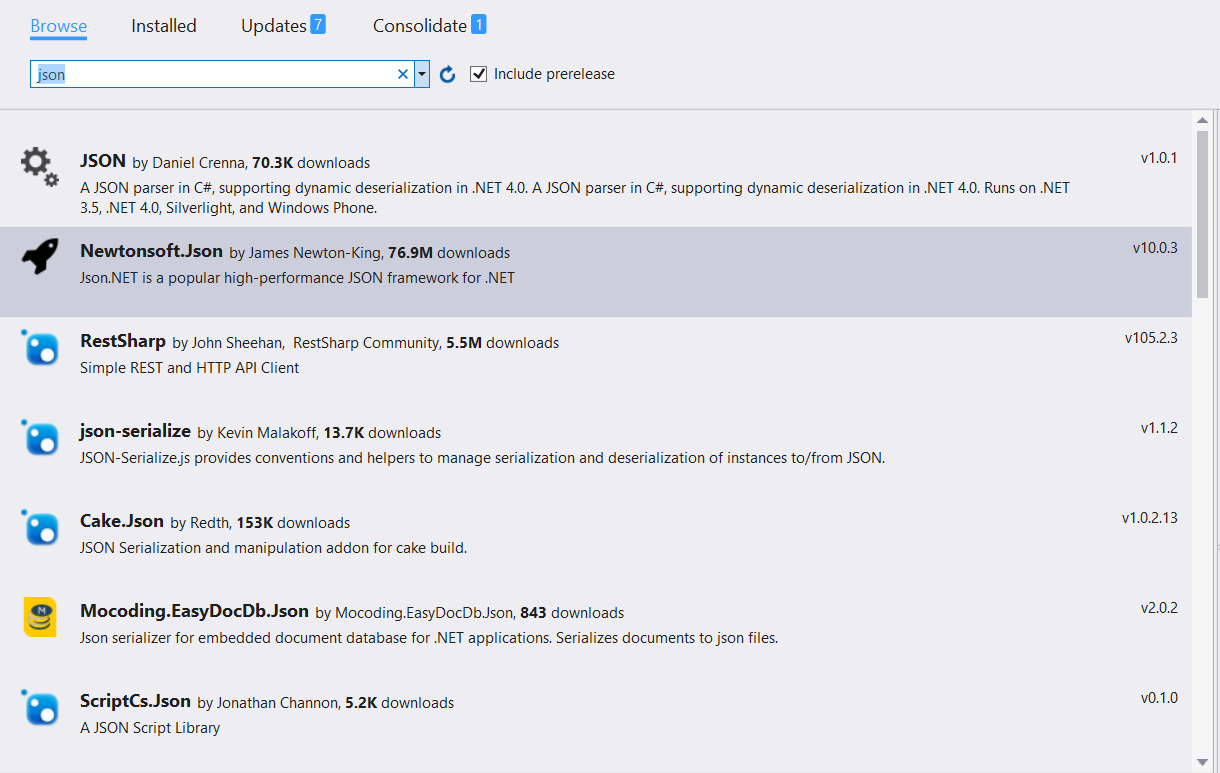
Create Uri custom extension method for append the query string .
public static class Common
{
/// <
/// BuildQueryString
/// </
/// <param name="uri"></param>
/// <param name="parameters"></param>
/// <returns></returns>
public static Uri BuildQueryString(this Uri uri, Dictionary<string, string> parameters)
{
var stringBuilder = new StringBuilder();
string str = "?";
foreach (KeyValuePair<string, string> item in parameters)
{
stringBuilder.Append(str + item.Key + "=" + item.Value);
str = "&";
}
return new Uri(uri + stringBuilder.ToString());
}
}
We already created Get Azure Functions, before writing c# code, copy functions url of Azure portal and write HTTP get client method as per below. The HTTP Client will automatically include in the latest Dot net framework.
using Newtonsoft.Json;
using System.Text;
namespace AzureFunctionsDemo
{
public class AzureFunctionHelper
{
// Remember to paste below your Azure Function url copied before in the Portal:
const string AZURE_FUNCTION_URL = "https://devenvexefunctiondemo.azurewebsites.net/api/HttpTriggerCSharp1";
// Remember to paste below your Azure Function Key copied before in the Portal:
const string AZURE_CODE = "fnNK7ncbR3QKAgMgXAaV1gnPMgaPaqUTH3mbv7gi9nM9zt7yJImeng==";
/// <
///Get Azure Functions
/// </
/// <typeparam name="T"></typeparam>
/// <param name="name"></param>
/// <returns></returns>
public async Task<object> GetAsync<T>(string value)
{
var httpClient = new HttpClient();
Dictionary<string, string> query = new Dictionary<string, string>();
query["code"] = AZURE_CODE;
query["name"] = value;
Uri uri = new Uri(AZURE_FUNCTION_URL).BuildQueryString(query);
var content = await httpClient.GetStringAsync(uri);
return JsonConvert.DeserializeObject(content);
}
}
Now you can start calling GetAsync method from MainPage.xaml.cs file
using Xamarin.Forms;
namespace AzureFunctionsDemo
{
public partial class MainPage : ContentPage
{
{
InitializeComponent
}
async void OnButtonClicked(object sender, EventArgs args)
{
//Show Wait indicator
waitindicator.IsVisible = true;
waitindicator.IsRunning = true;
//Calling Azure Function
AzureFunctionHelper oazurehelper = new AzureFunctionHelper();
var value = await oazurehelper.GetAsync<string>(txtname.Text);
//print azure fucntion return value
lblname.Text = value.ToString();
//Disable wait Indicator after loading output
waitindicator.IsVisible = false;
waitindicator.IsRunning = false;
}
}
}
We have completed all the code for consuming Azure Function from xamarin, we can select the platform and Press F5, the output look like below



Summary :
You have Learned from here ,how to create an Azure function without own server . Azure Functions were directly called through HTTP from Xamarin Forms Application .This article share for beginners , you should try different service in Azure Functions and implement in Xamarin Forms Application .If you have any questions/ feedback/ issues, please write in the comment box.
The given information was excellent and useful. This is one of the excellent blog, I have come across. Do share more.
ReplyDeleteAzure Training in Chennai
Azure Training center in Chennai
Cloud Computing Courses in Chennai
Cloud Computing Training in Velachery
AWS Training in Chennai
AWS course in Chennai
DevOps Certification in Chennai
Cloud computing Training in Chennai
Informative post. Thanks for sharing
ReplyDeletemobilesolutionforazure
Woah!! Such a piece of the nice information you have shared here, I have read the entire post and I must say that the information is very helpful for me.
ReplyDeletexamarin development company
Nice post. I was checking continuously this blog and I’m impressed! Extremely useful info specially the last part I care for such info much. I was looking for this particular info for a very long time. Thank you and good luck.
ReplyDeleteHire Xamarin Developer
Xamarin Development Company
I am really impressed after reading your amazing article about hire dedicated & remote mobile app developers. I say thanks for sharing valuable information with us.
ReplyDeleteHire Dedicated Xamarin App Developer