Azure

Getting Started Azure Functions using Azure Free Trial Account

by Tuesday, August 15, 2017 comments
Azure Function is a solution for easily running small pieces of code in the cloud. Create, Execute and test your custom logic function without creating a VM, Web Applications, and no need install any software and infrastructure to run the function. You can use development language of as per your choice below
  • C#
  • F#
  • Node.js
  • Python
  • PHP
Pay only for the time your code runs and trust Azure to scale as needed. Azure Functions let you develop server less applications on Microsoft Azure. In this Article, you will learn how to create azure Functions without create Azure account.

How to create an Azure Functions:

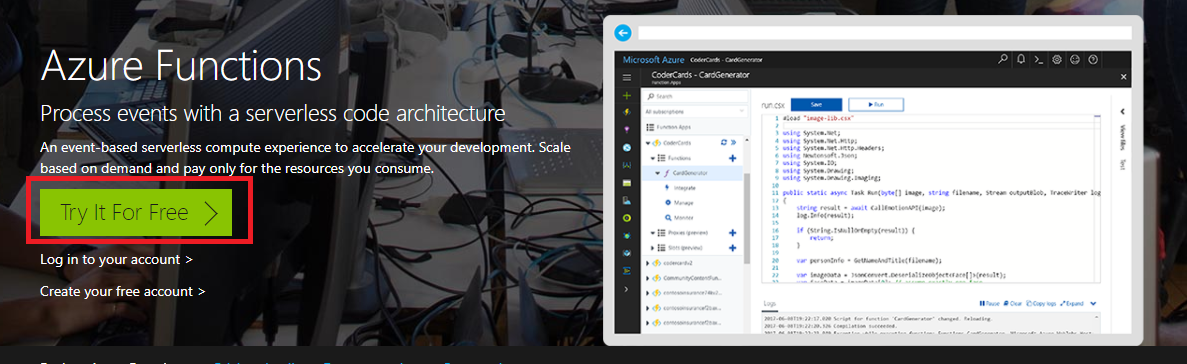
Step 1: Navigate to https://functions.azure.com and click on try it For Free


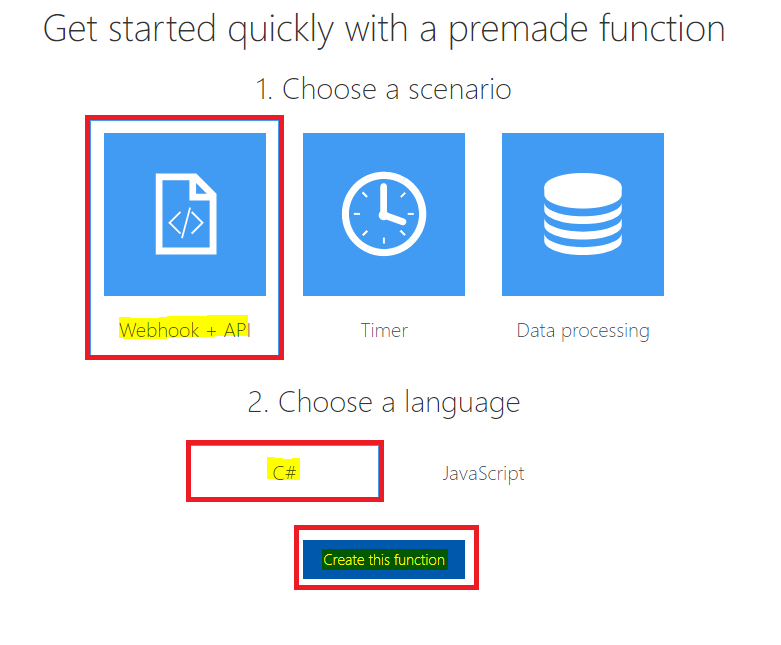
Step 2: Create Azure Premade function.

Choose the functions scenario (WebAPI/timer/Processing),

Free trail will allow only two language (c# and JavaScript), Select your Language and click on Create the Function.

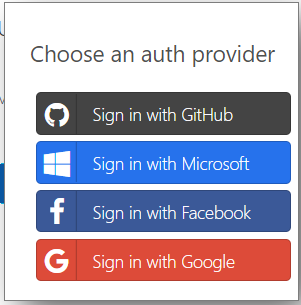
Step 3: Login with any of following provider without creating azure account.


Step 3: Azure Function Editor
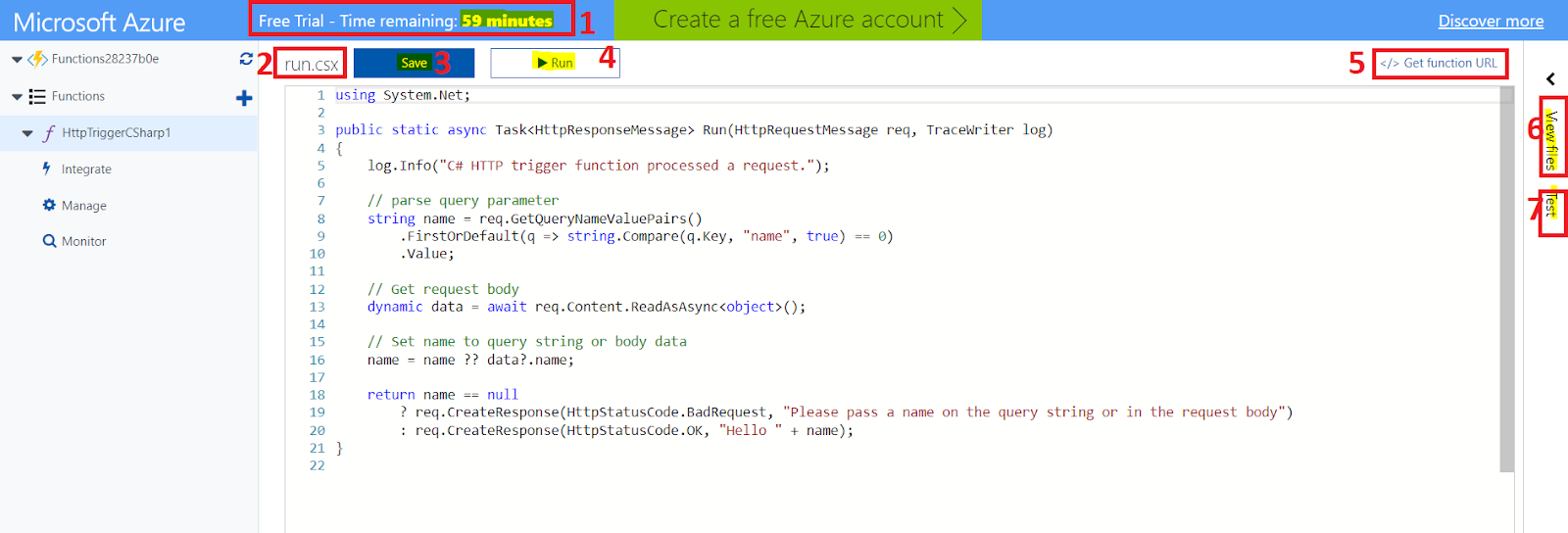


Azure functions Edit was following feature

Microsoft Azure free trial Functions edit will give access only 60 Minutes .

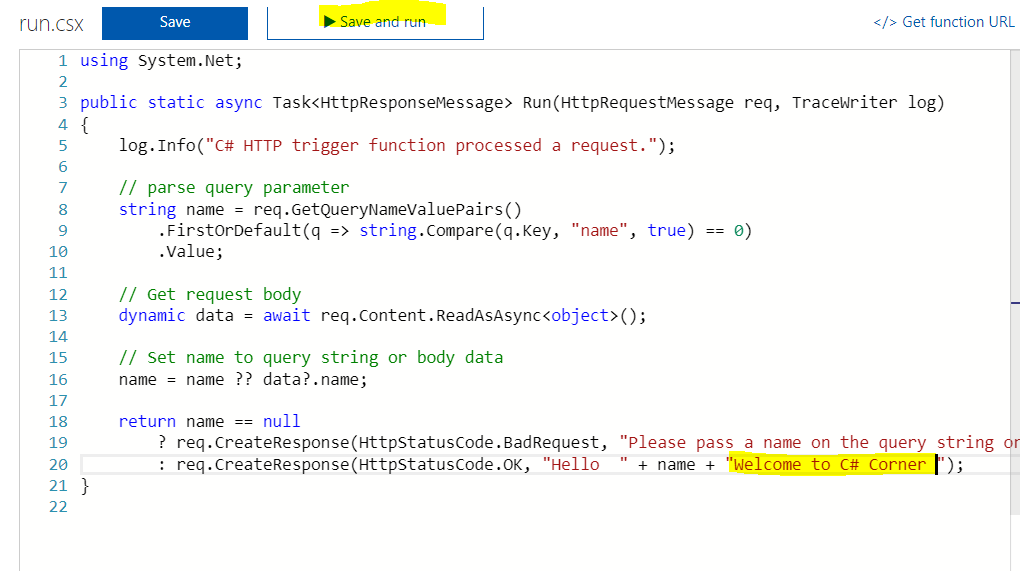
You can edit c# azure function in Run.csx file as per your requirement

Save the changes

Run the Functions

Get Function URL button will provide the public functions url

View File button for list of file will display

Test button for Test the function

View File Window.

You can Add and upload file using File explore window and system will generate two files functions.json for configuration and run.csx file for create c# custom method .
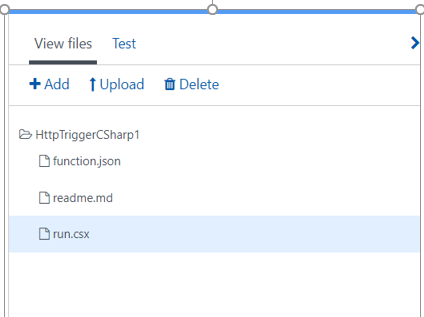


Run.csx File

The .csx file format allows you to writing a C# function. Include any assembly references and namespaces at the beginning of the file as usual in c# and write your logic in Run method as like below


Function.Json File

The function.json file defines the function bindings and other configuration settings. how to pass data into and return data from function execution. The name that is used for the bound data in the function. For C#, this is an argument name; for JavaScript, it's the key in a key/value list.

You can refer the following is an example function.json file.


Test the Function

You can test Azure functions on multiple way, Here I will explain on two ways to Run /test from an Azure Function editor and test with the Browser

You can use to do testing with click on a test button and provide the request body a JSON string similar to the following in the request body field and click on the Run button
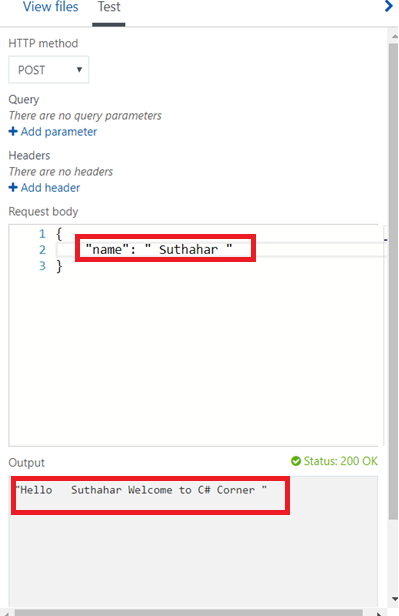


Test with a Browser

The web browser is a simple way to trigger functions via HTTP. You can use a browser for GET requests that do not require a body payload, and that use only query string parameters.

To test the function, we defined earlier, copy the Function Url from the Azure function portal like below
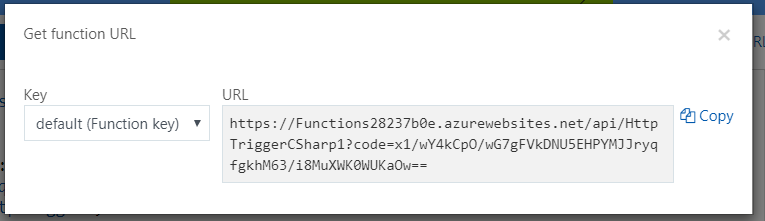


Append the name parameter to the query string. Use an actual name for the <Enter a name here> placeholder.

https://<Your Function App>.azurewebsites.net/api/<Your Function Name>?code=<your access code>&name=<Enter a name here>

Paste the URL into your browser, and you should get a response similar to the following.



The Chrome browser will have returned string in XML. Other browsers display just the string value.

Summary

In this article, you learned about Azure functions, how to create Azure functions with create Azure account and test Azure functions

If you have any questions/ feedback/ issues, please write in the comment box.

SJ
Suthahar Jegatheesan

Senior Solutions Architect · Microsoft Azure, AI & Mobile. Author of the Xamarin Q&A Book.

No comments:

sponsored

What Colleagues Say

“Suthahar is one of the most thorough and knowledgeable cloud architects I’ve worked with. His depth on Azure and ability to make complex mobile solutions work cross-platform is remarkable. He always delivers beyond expectations.”

AT Arun T. Senior Engineering Manager · Direct Manager

“I’ve followed Suthahar’s MSDEVBUILD blog for years — practical, deep, always current. Working alongside him confirmed what I suspected: he’s as sharp in person as on paper, and a genuinely generous mentor and architect.”

RK Rajesh K. Lead Developer · Mindtree

Certifications & Recognition

AZ-300 · Azure Architect Technologies AZ-301 · Azure Architect Design AZ-104 · Azure Administrator Associate AI-100 · Designing Azure AI Solutions DP-900 · Azure Data Fundamentals MCPD · Windows Phone Certified SAFe® 4 Scrum Master

Technical Expertise

☁ Cloud Platforms Microsoft Azure — Expert · 18 yrs App Services · AKS · Functions · Cosmos DB · APIM · Entra ID AWS & Google Cloud — Advanced
๐Ÿค– AI & Automation Azure OpenAI / GenAI — Advanced · 5 yrs RAG Pipelines · Bot Framework · Cognitive Services · Vision & Speech AI · ML.NET
๐Ÿ“ฑ Mobile Architecture .NET MAUI & Xamarin — Expert · 12 yrs Flutter · Native iOS/Android · Offline-First · Secure Storage & Auth
๐Ÿ”’ Identity & Security Microsoft Entra ID — Expert OAuth 2.0 · OIDC · Zero Trust · Conditional Access · RBAC · Key Vault

Speaking & Community

Microsoft User Group Malaysia Recurring speaker on Azure architecture, AI integration and .NET mobile development across Malaysia and APAC.
Global Azure Bootcamp — Chennai Presented “AI into Xamarin Mobile Apps” at GAB Chennai, part of the worldwide Global Azure community event.
AI & Azure OpenAI Community Events Workshops and live demos on RAG pipelines, AI agents and intelligent workflow automation since 2023.
Mobile & Cloud Workshops — Coimbatore Multi-day deep-dive sessions at GRG Computer Technology, KG Microsoft Innovation Center and RVS College of Arts and Science.
500+Blog Articles
50+Conference Talks
10K+Monthly Readers
30Public Repositories
3Continents Delivered
MSDEVBUILD Assistant Ask about Suthahar, Azure, AI or mentorship
Hi! I’m a simple FAQ bot for MSDEVBUILD. Tap a question below or type your own.