Introduction:
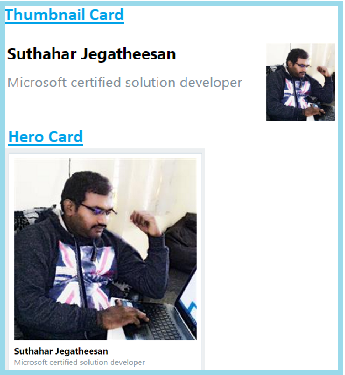
The Bot Framework has supported the different type of rich cards and provides a richer interaction experience to the user. In this article, I will share about how to integrate Thumbnail card UI design in Bot Application. The Thumbnail card is a multipurpose card, its contains small an image, title text, sub text , multiple buttons, and a card tap action.
A Hero Card and a Thumbnail Card have different in the size of image and text alignment of card .
Prerequisite:
I have explained about Bot framework Installation, deployment and implementation in the below article
Create New Bot Application:
Let's create a new bot application using Visual Studio 2017. Open Visual Studio > Select File > Create New Project (Ctrl + Shift +N) > Select Bot application.

The Bot application template was created with all the components and all required NuGet references installed in the solutions.

Create New ThumbnailCardDialog Class:
Step 1:
You can Create new ThumbnailCardDialog class for a show the ThumbnailCard dialog. Right Click on project > Select Add New Item > Create a class that is marked with the [Serializable] attribute (so the dialog can be serialized to state) and implement the IDialog interface.
{
{
|
Step 2
{
}
|
Step 3:
Create a MessageReceivedAsync method and write following code for the welcome message and show the list of demo options dialog.
/// <
///
/// </
/// <
/// <
/// <
public async virtual Task MessageReceivedAsync(IDialogContext context, IAwaitable<IMessageActivity> result)
{
var message = await result;
var welcomeMessage = context.MakeMessage();
welcomeMessage.Text = "Welcome to bot Thumbnail Card Demo";
await context.PostAsync(welcomeMessage);
await this.DisplayThumbnailCard(context);
}
/// <summary>
/// DisplayThumbnailCard
/// </
/// <
/// <
public async Task DisplayThumbnailCard(IDialogContext context)
{
var replyMessage = context.MakeMessage();
Attachment attachment = GetProfileThumbnailCard(); ;
replyMessage.Attachments = new List<Attachment> { attachment };
await context.PostAsync(replyMessage);
}
|
After user enter the first message, bot will reply welcome message like below

Step 4: Design Thumbnail Card:
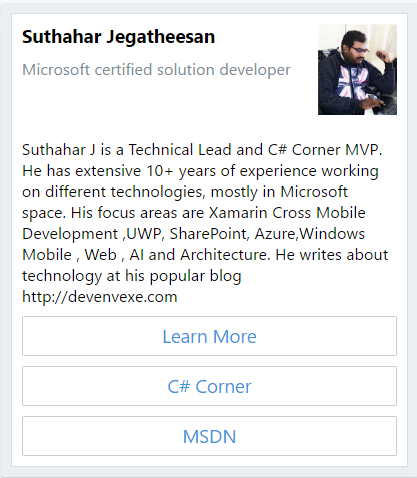
The Thumbnail card typically contains a small image with left alignment, one or more buttons, and text. Thumbnail Card class has the following property
- Title - Title text of the card
- Subtitle -sub title text for the title
- Text – Summary text to display on the card
- Images – Display small image with left alignment
- Buttons - One or more buttons. The Skype allow only 5 buttons will display on a card. If you have more buttons, you can create two cards.
- Tap - An action that is triggered when a user taps on the card.
The following code showing design the user profile message with image, text, subtext and action button. .
/// <summary>
/// GetProfileThumbnailCard
/// </
/// <
private static Attachment GetProfileThumbnailCard()
{
var thumbnailCard = new ThumbnailCard
{
// title of the card
Title = "Suthahar Jegatheesan",
//subtitle of the card
Subtitle = "Microsoft certified solution developer",
// navigate to page , while tab on card
Tap = new CardAction(ActionTypes.OpenUrl, "Learn More", value: "http://www.devenvexe.com"),
//Detail Text
Text = "Suthahar J is a Technical Lead and C# Corner MVP. He has extensive 10+ years of experience working on different technologies, mostly in Microsoft space. His focus areas are Xamarin Cross Mobile Development ,UWP, SharePoint, Azure,Windows Mobile , Web , AI and Architecture. He writes about technology at his popular blog http://devenvexe.com",
// smallThumbnailCard Image
Images = new List<CardImage> { new CardImage("http://csharpcorner.mindcrackerinc.netdna-cdn.com/UploadFile/AuthorImage/jssuthahar20170821011237.jpg") },
// list of buttons
Buttons = new List<CardAction> { new CardAction(ActionTypes.OpenUrl, "Learn More", value: "http://www.devenvexe.com"), new CardAction(ActionTypes.OpenUrl, "C# Corner", value: "http://www.c-sharpcorner.com/members/suthahar-j"), new CardAction(ActionTypes.OpenUrl, "MSDN", value: "https://social.msdn.microsoft.com/profile/j%20suthahar/") }
};
return thumbnailCard.ToAttachment();
}
|
The above code will generate thumbnail card and reply to the user
Run Bot Application
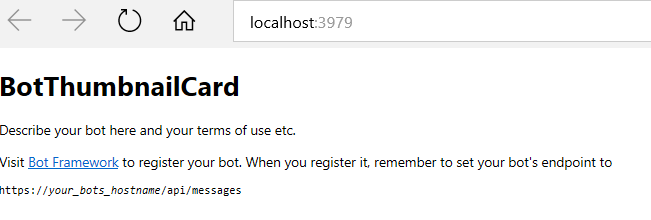
The emulator is a desktop application that lets us test and debug our bot on localhost. Now, you can click on "Run the application" in Visual studio and execute in the browser
Test Application on Bot Emulator
You can follow the below steps to test your bot application.
- Open Bot Emulator.
- Copy the above localhost url and paste it in emulator e.g. - http://localHost:3979
- You can append the /api/messages in the above url; e.g. - http://localHost:3979/api/messages.
- You won't need to specify Microsoft App ID and Microsoft App Password for localhost testing, so click on "Connect".

Summary
In this article, you learned how to create a Bot application using Visual Studio 2017 and create Thumbnail card design using bot framework. If you have any questions/feedback/ issues, please write in the comment box.
No comments: