Issue :
While trying adding Nuget package for Azure Active Directory ('Microsoft
Severity
|
Description
|
Error
|
Could not install package 'Microsoft
|
Solution:
Remove Installed all Nuget package
Removing the windows Phone 8.1 project from solution
Remove target platform from the PCL project
Step 1: Remove Installed all Nuget package
Go To solution > Right Click > Manage Nuget Packages > Click on Installed tab > uninstall all installed package like (Including Xamarin.Form etc ) .
If you are not uninstall the package and trying to change the targeted platforms by removing the target Windows Phone 8.1 you would get an error.

Step 2: Remove the Windows 8.1 project from Solution
ADAL does not support Windows Phone 8.1 so you need remove windows 8.1 project from solution . Only removing the Windows Phone 8.1. project from your solution will not resolve this issue. You still need follow next steps as well
Step 3: Remove target platform from the PCL project
Right click on your PCL project > Click on “Properties” > Go to the tab “Library” > You can see list of targeted platforms > Press the button “Change” > uncheck the target “Windows Phone 8.1” and “ Windows Phone Silvelight 8” > Press the “OK” button
Wait a few seconds and the dialog will be gone and the target is removed from the PCL project.
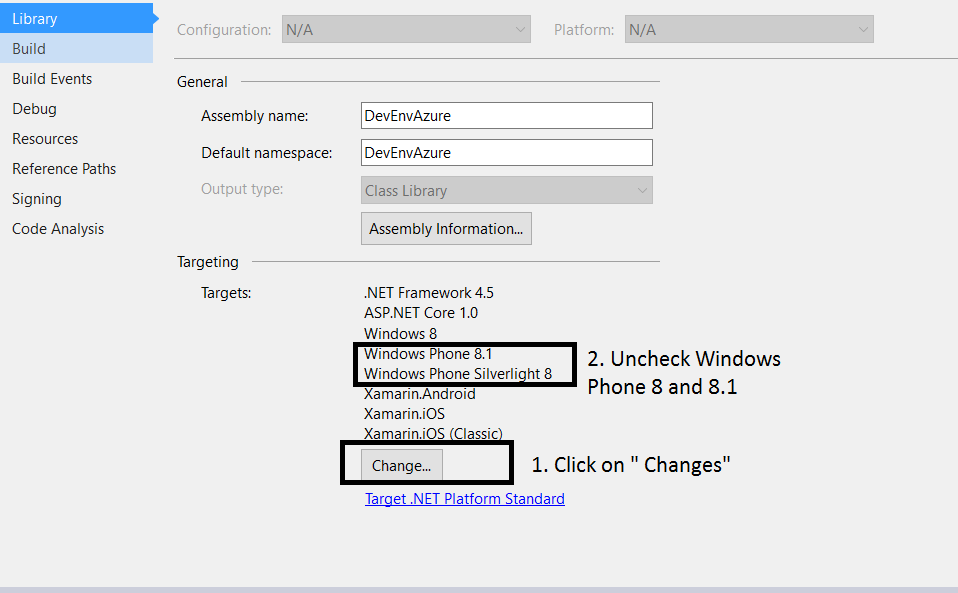
Now you can able to install ADAL nuget package from your solution

No comments: